
Six AWS Security Controls a Solo Developer Cannot Skip

A leaked AWS key can become an active incident before its owner notices the commit. Palo Alto Unit 42 monitored the "EleKtra-Leak" campaign from August 30 to October 6, 2023 and found 474 unique miner instances that were potentially actor-controlled, with over 400 API calls arriving within seven minutes of a key's exposure. AWS quarantines some credentials it detects in public repositories, but that safety net does not catch every case, and it does not catch keys leaked anywhere other than a public repo.
The payoff is no longer just cryptocurrency. Stolen credentials launch Spot fleets, send spam through SES, and increasingly burn foundation-model quota, a pattern AWS now tracks as its own threat technique. Sysdig, which named the technique LLMjacking, watched one July 2024 incident produce 80,000 calls in three hours and a bill between $24,000 and $30,000. It estimated that abuse of a single Claude account could exceed $46,000 per day. The Cloud Security Alliance's March 2026 write-up of "Operation Bizarre Bazaar" counted 35,000 attack sessions between December 2025 and January 2026, averaging 972 attacks per day. Resale markets and reverse proxies have made this an industry.
Three reports anchor the threat model for this series:
CloudKeys in the Air: Tracking Malicious Operations of Exposed IAM Keys
We analyze an attack path starting with GitHub IAM exposure and leading to creation of AWS Elastic Compute instances — which TAs used to perform cryptojacking.
unit42.paloaltonetworks.com/malicious-operations-of-expos...LLMjacking: Stolen Cloud Credentials Used in New AI Attack | Sysdig
The Sysdig Threat Research Team found new attack that targets large language model (LLM) services, known as LLMjacking.
sysdig.com/blog/llmjacking-stolen-cloud-credentials-used-...AWS has moved the defaults in the right direction. Root MFA is enforced across account types, a root user can register up to eight MFA devices, S3 Block Public Access and default encryption are on for new buckets, and IMDSv2 can be set as an account default per region. What has not changed is the financial boundary: a standard pay-as-you-go account has no true global spending limit. Only new Free plan accounts close themselves when credits or the six-month term run out. Everything else keeps billing until a human intervenes.
The hardening program uses one worked example: a single-user account with a hosted zone, a static site, and no databases or long-running compute. That profile covers many personal AWS accounts, and it is deliberately modest because controls only help when people finish setting them up. The program has four tiers. This first one covers six controls for the first hour, before anything clever. They are free, take about an hour together, and address the two failures that cost people money: account takeover and a bill nobody sees until the invoice.
Update the contacts before you touch anything else#
Account recovery depends on a reachable email address and a verified phone number on the primary contact, plus the three alternate contacts: Billing, Operations, and Security. If you enable MFA on an account whose contact email is an address you abandoned two jobs ago, you have built a lockout, not a control.
In the console, this is the account menu at top right, then Account. Edit the contact information, verify the phone number, and set the three alternate contacts to addresses you actually read. Distribution lists are better than a personal inbox, even for one person, because a list survives you changing email providers.
The Account API covers the alternate contacts:
aws account put-alternate-contact --alternate-contact-type SECURITY \
    --email-address security@example.com --name "Security" \
    --phone-number "+1..." --title "Security"
Repeat for BILLING and OPERATIONS. Primary phone verification stays a manual console step. This is where fraud notices and recovery codes land, so treat the addresses as operational, not decorative.
You can find this option if you navigate to "Billing and Cost Management" and then "Account"
 Alternate Contacts in AWS Account
Put two phishing-resistant MFA devices on root#
The root user can close the account, change billing, and step around every IAM policy in the account. AWS treats it as a break-glass identity, and it deserves stronger protection than any identity you use daily.
Phishing resistance is the distinction that matters. FIDO2 passkeys and security keys use public-key cryptography bound to the origin, so a phishing page cannot replay them. TOTP authenticator apps and hardware TOTP tokens are better than nothing, but a convincing login page still collects a working code. AWS recommends passkeys and security keys directly.
Register more than one device. AWS has supported up to eight MFA devices per user since November 2022, and the June 2025 root MFA announcement reconfirmed it for root and IAM users alike. With only one device, losing a phone or security key turns recovery into a support case.
You can follow these instructions to set the MFA devices for an account.
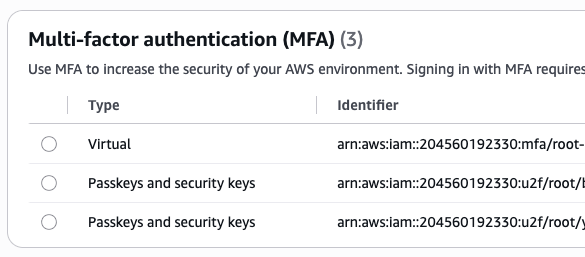 Passkeys
Sign in as root, open Security credentials, set a long unique password stored in a password manager, then use Assign MFA device twice. A workable solo pairing is one hardware security key plus a passkey synced through your password manager. A second hardware key stored somewhere physically different is better if you have one.
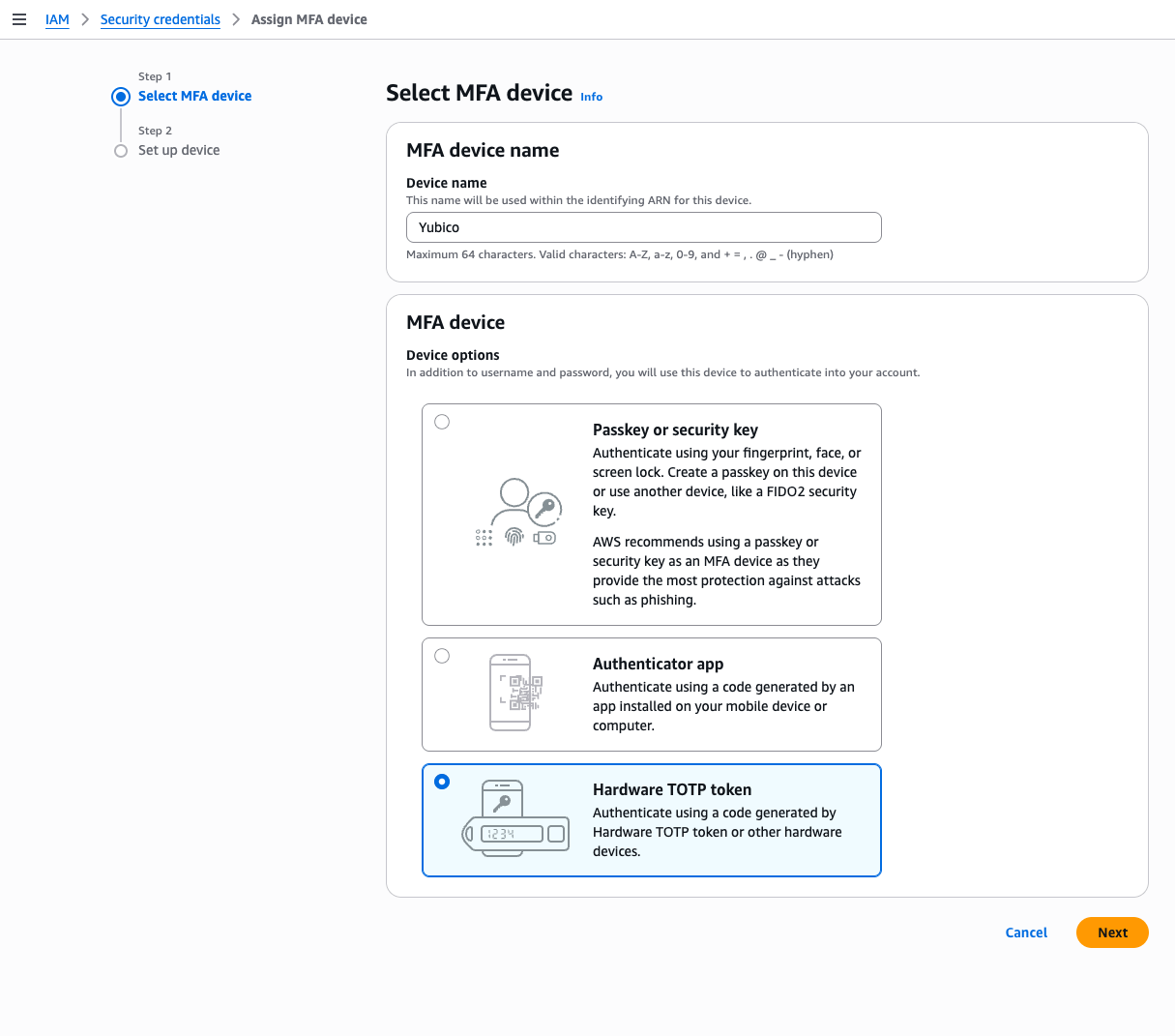 Passkey dialog
Hardware costs money now. YubiKey 5 NFC and 5C NFC list at $58, the FIDO-only Security Key series runs around $29, and FIPS variants land between $88 and $115. AWS's free MFA security-key program was discontinued effective November 6, 2025: existing devices keep working, but no new orders are accepted. One key can back many accounts and many users, so the per-account cost is lower than the sticker suggests.
Delete the root access keys#
Root should not have long-lived access keys. AWS says so plainly: there is no workload that needs them, and no automation that should depend on them.
aws iam delete-access-key --access-key-id AKIA...
That command has to run as root, or you can delete the keys from the same Security credentials page. Before you do, check CloudTrail for recent activity from that key ID. If something in your setup is still authenticating as root, deleting the key breaks it, and you want to find that out deliberately rather than at 2am. Whatever it is should move to an IAM role or an Identity Center session, which is the subject of the next post in this series.
The IAM user is the hole in most hardening lists#
Almost every AWS hardening checklist secures root and then moves on. On an account this size that leaves the actual problem untouched.
You probably have one IAM user. It probably has AdministratorAccess. It probably has an access key sitting in ~/.aws/credentials that has never been rotated. An attacker who phishes that user gets everything root has except the account-closure button, and they get it without touching the credential you just spent twenty minutes protecting.
Give that user a phishing-resistant MFA device too, from IAM → Users → your user → Security credentials. While you are there, delete any access key you cannot account for. Then pull a credential report, which is the fastest way to see the whole picture at once:
aws iam list-mfa-devices --user-name <user>
aws iam list-access-keys --user-name <user>
aws iam generate-credential-report && aws iam get-credential-report \
    --query Content --output text | base64 -d | column -s, -t
The report is a CSV covering every user's password age, key age, last-used timestamps, and MFA status. Stale keys are obvious in it.
If you want to go further, deny everything unless MFA is present in the session:
{
    "Effect": "Deny",
    "NotAction": [
        "iam:CreateVirtualMFADevice", "iam:EnableMFADevice",
        "iam:GetUser", "iam:ListMFADevices", "sts:GetSessionToken"
    ],
    "Resource": "*",
    "Condition": { "BoolIfExists": { "aws:MultiFactorAuthPresent": "false" } }
}
The BoolIfExists is deliberate. With a plain Bool, calls that carry no MFA context at all, including some service-linked and role-based paths, get denied along with the ones you meant to catch.
A budget that tells you before the invoice does#
AWS Budgets will not stop spending. It tells you that spending happened, which on a small account is most of the value, because the difference between finding a compromise on day one and finding it on the statement is roughly two orders of magnitude in dollars.
Create a monthly cost budget in Billing and Cost Management. Pick a number just above your normal spend, low enough that any real anomaly trips it; only you know how much you're going to be or are spending per month, so use that amount. Add alert thresholds at 50%, 80%, and 100% on actual spend, then add a forecasted alert as well. Actual alerts tell you what already happened; forecasted alerts catch a trajectory before it lands.
aws budgets create-budget --account-id <id> --budget file://budget.json \
    --notifications-with-subscribers file://notify.json
 Monthly Budget
Monitoring budgets are free. AWS gives 62 free budget-days per month, and a single always-on budget consumes about 30 of them. Budgets beyond that allotment cost $0.02 per budget-day, down from $0.10 before October 2020.
Do not mistake the budget for a real-time control. It refreshes only a few times a day, roughly every 8 to 12 hours, so an attacker can accumulate substantial charges between updates. Forecasted alerts also need a few weeks of history before they mean anything on a young account. The controls that actually cap damage are quotas and region restrictions, which the third post covers.
While you are in the billing console, confirm Cost Anomaly Detection is on. It is free, it needs Cost Explorer enabled, and since March 27, 2023 it has been auto-enabled for new Cost Explorer users with a service-level monitor that emails daily summaries. It learns your normal pattern instead of watching a fixed threshold, so it often flags a spike well before a monthly budget does. A November 2025 algorithm update moved it to rolling 24-hour windows. New monitors need about a day to arm, and a service you have never used before needs roughly ten days of history before it can be flagged as anomalous.
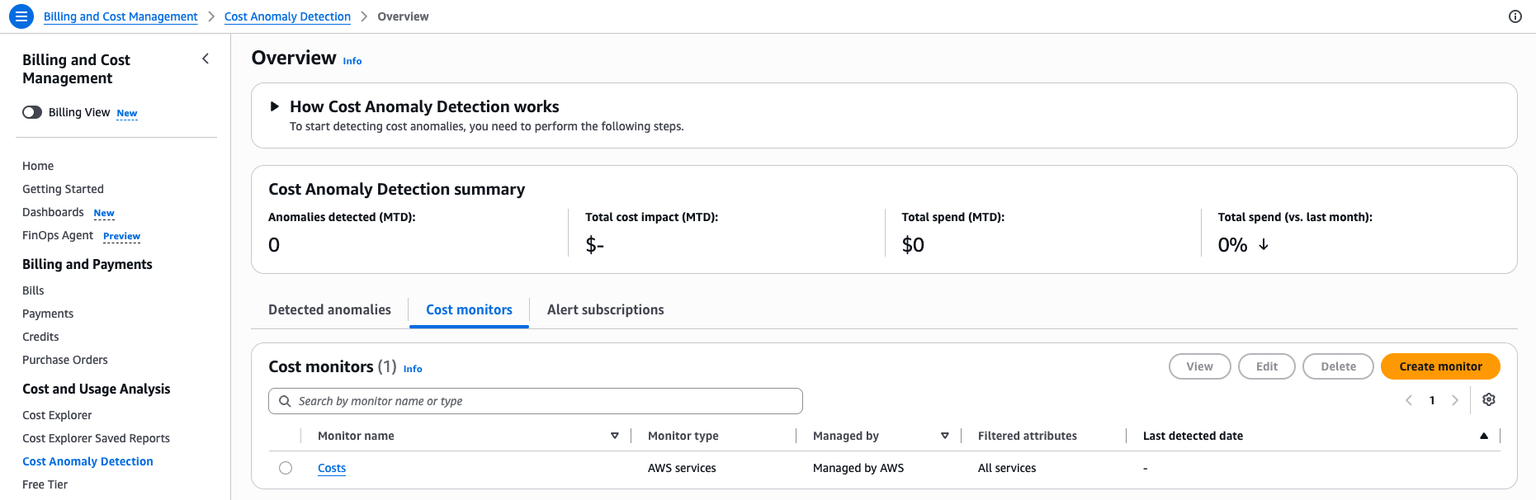 Cost Anomaly
An alert the moment root signs in#
After the previous five controls, a root sign-in is either you doing one of a handful of root-only tasks, or it is an incident. Either way you want an email about it.
There is a regional quirk that trips people up. CloudTrail records root console sign-in events in us-east-1 regardless of where you work, so the EventBridge rule that catches them has to live in us-east-1 too.
 CloudTrail Management Events logging
Three steps. Create an SNS topic and confirm the email subscription. Create a multi-region CloudTrail trail for management events, delivering to a new S3 bucket. Then create the EventBridge rule in us-east-1 with the SNS topic as its target:
{
    "detail-type": ["AWS Console Sign In via CloudTrail"],
    "detail": { "userIdentity": { "type": ["Root"] } }
}
You also need an SNS resource policy allowing events.amazonaws.com to call sns:Publish on the topic.
{
    "Version": "2012-10-17",
    "Statement": [
        {
            "Effect": "Allow",
            "Action": [
                "sns:Publish"
            ],
            "Resource": [
                "arn:aws:sns:us-east-1:<aws-account-id-here>:ROOT-AWS-Console-Sign-In-via-CloudTrail"
            ]
        }
    ]
}
The first copy of management events is free in every region, and the 90-day CloudTrail event history is free as well, though the history alone cannot trigger anything. You pay S3 storage for the delivered log files, which, depending on an account size, can be cents per month or more. A second trail, or an organization trail overlapping a member trail, bills additional management-event copies at $2.00 per 100,000 events. Data events, at $0.10 per 100,000, are the classic way to turn a two-dollar bill into a surprise. Leave them off.
The same pattern extends to other events worth an email: CreateUser, CreateAccessKey, AttachRolePolicy, and console sign-in failures. Start with root.
But if you want, the rule can look something like this:
{
  "source": ["aws.iam"],
  "detail-type": ["AWS API Call via CloudTrail"],
  "detail": {
    "eventSource": ["iam.amazonaws.com"],
    "eventName": ["CreateUser", "CreateAccessKey", "AttachRolePolicy"]
  }
}
and for the failed Console login:
{
  "source": ["aws.signin"],
  "detail-type": ["AWS Console Sign In via CloudTrail"],
  "detail": {
    "eventSource": ["signin.amazonaws.com"],
    "eventName": ["ConsoleLogin"],
    "responseElements": {
      "ConsoleLogin": ["Failure"]
    }
  }
}
Build the break-glass path while nothing is broken#
Every control in the rest of this series can lock you out if you get it wrong. Set up two recovery paths now, while both are free and nothing is broken.
The first is root, protected by a phishing-resistant MFA device and a backup device, with credentials stored in a password manager and ideally a physical safe. Root can override any identity-policy mistake you make in your own account.
The second is an IAM user with AdministratorAccess and its own MFA. Document it, use it rarely, and store its credentials offline. When the later posts add a region-deny policy and a budget action, this user stays outside both. A break-glass identity that your guardrails can reach is not a break-glass identity.
When the alert fires#
Assume it will, and write the steps down before you need them.
- Deactivate the leaked key immediately with
aws iam update-access-key --status Inactive, rotate the root password, and revoke active IAM or Identity Center sessions. Reset root MFA if you are not certain of its integrity. - Search CloudTrail in every region, not just the one you use. Attackers deliberately work in regions you never open, and a per-region console view looks clean while instances run elsewhere. One documented victim found instances in Ireland and Frankfurt plus a separately managed set of Spot instances.
- Delete unauthorized resources in every region: On-Demand and Spot instances, SageMaker resources, Bedrock usage, and any IAM users, keys, or roles the attacker created.
- Review GuardDuty findings if you have it enabled, to scope what happened.
- Open a support case and contact AWS Trust and Safety. Say plainly that the account was compromised, list what you found and terminated, and dispute the charges as unauthorized usage.
- Find the class of failure, not just the instance of it. A leaked key means the pipeline that leaked it needs fixing, not just the key.
One thing not to rely on: refunds. AWS often waives charges from a confirmed compromise when the owner acts quickly, and there are public accounts of $14,000 written off after a key leak. There are also public accounts of AWS declining, including a $2,343 bill the reviewer did not consider fraudulent. Treat a refund as a possible outcome, never as a control.
What this costs#
| Control | Recurring cost |
|---|---|
| Account and alternate contacts | $0 |
| Root MFA (two devices) | $0 plus hardware, roughly $29 to $58 per key |
| Deleting root access keys | $0 |
| MFA on the IAM user, credential report | $0 |
| Budget with actual and forecasted alerts | $0, within the free 62 budget-days |
| Cost Anomaly Detection | $0 |
| CloudTrail trail plus root-login alert | $0 in events, roughly $0.01 to $0.50 in S3 storage |
An hour of work and pocket change per month. The next post in this series deals with the harder problem: root MFA protects the account, but you still have to stop using root, and doing that properly means IAM Identity Center, a billing setting almost nobody knows about, and getting the last static access key out of your CI pipeline.
Further reading#
Sources for the specific claims above are linked inline. These three are worth a visit on their own:
- Multi-factor authentication in IAM, the full reference for device types, registration, and recovery
- Cost Anomaly Detection FAQs and the setup guide, which cover monitor types and the detection window in more detail than this post does
Originally published at https://iuriio.com/blog/posts/2026/08/aws-hardening-must-do