
Shrinking the Blast Radius of an AWS Compromise


The budget from the first post in this series refreshes every 8 to 12 hours. And since alerting is not capping, and a standard pay-as-you-go account on AWS (unfortunately, come up, AWS!) has no spending cap to configure.
You can build a synthetic cap from controls that limit what an attacker can create. Everything here assumes the identity work from the previous post is done, because two of these controls can lock you out if there is no break-glass path.
The commands and policies below use us-west-2 as a stand-in home region and us-east-1 for the global endpoints (global services genuinely live there, and it goes down from time to time). Substitute your own home region for the first.
What the money actually gets spent on#
Worth being concrete, because it explains which ceilings matter:
- Cryptomining. Large or Spot EC2 instances across as many regions as the account allows (
C-family, likec5a.24xlarge). - LLMjacking. Bedrock inference resold through reverse proxies. Attackers probe
GetModelInvocationLoggingConfigurationfirst and skip accounts that have logging on, making it a free deterrent. - SES spam and SNS SMS pumping, exploiting premium-rate and international SMS billing.
- Generic resource hijacking, for other stuff.
Every one of those scales with quota and with region count. So those are the two dials.
Keep the expensive quotas low#
An attacker can only create what your quotas allow. An account that cannot launch a GPU instance cannot become a mining rig, no matter who holds the credentials.
The Service Quotas console, however, mostly supports increases. For many quotas you cannot self-service a decrease below the default; lowering one means opening a support case under the decrease category. Some quotas are not adjustable downward at all, as the quota's "Adjustable" flag will tell you.
For a minimal account this mostly resolves into a rule: do not request increases, and verify what you have.
aws service-quotas get-service-quota --service-code ec2 --quota-code L-1216C47A
aws service-quotas list-service-quotas --service-code ec2 | grep -i "P instances\|G instances"
- GPU P and G family On-Demand vCPUs should read 0. On most accounts they already do, because they stay at 0 until you ask.
- Standard On-Demand and Spot vCPUs should stay modest. Attackers prefer Spot, and EC2 raises some quotas automatically as legitimate usage grows.
- SES stays in its sandbox unless you request production access. The sandbox limits sending to verified addresses at 200 messages per day, which makes the account useless for spam.
- Bedrock foundation-model access is opt-in and off by default. Leave the models disabled in Model Access. An attacker can call
PutFoundationModelEntitlementto enable them, so pair the default with a deny policy and an alert rather than treating it as settled.
Quotas are per-region, so check each region you actually use. And be aware that a past-due invoice can park quota tickets in a suspended queue, which is a bad time to discover you need one.
Disable the opt-in regions you do not use#
This is a stronger control than any policy, because it is an account-level switch rather than something an attacker with IAM write access can detach.
It only covers part of the map. Regions launched before March 20, 2019 are enabled by default and cannot be disabled. Regions launched after that date are disabled by default and must be opted into. So this reaches Milan, Cape Town, Bahrain, Jakarta, Hyderabad, Zurich, Melbourne, Tel Aviv, Spain, Calgary and the rest of the newer set. It does not reach us-east-1, us-west-2, or the other 17 default regions.
aws account list-regions --region-opt-status-contains ENABLED
aws account disable-region --region-name af-south-1
The console path is the account menu, then Account, then AWS Regions, and the DisableRegion API does the same thing programmatically. AWS made this free in all commercial regions in February 2023.
Disable and enable are asynchronous and take minutes to hours. And because default regions cannot be disabled, this does not replace the policy below. It just shrinks what the policy has to cover.
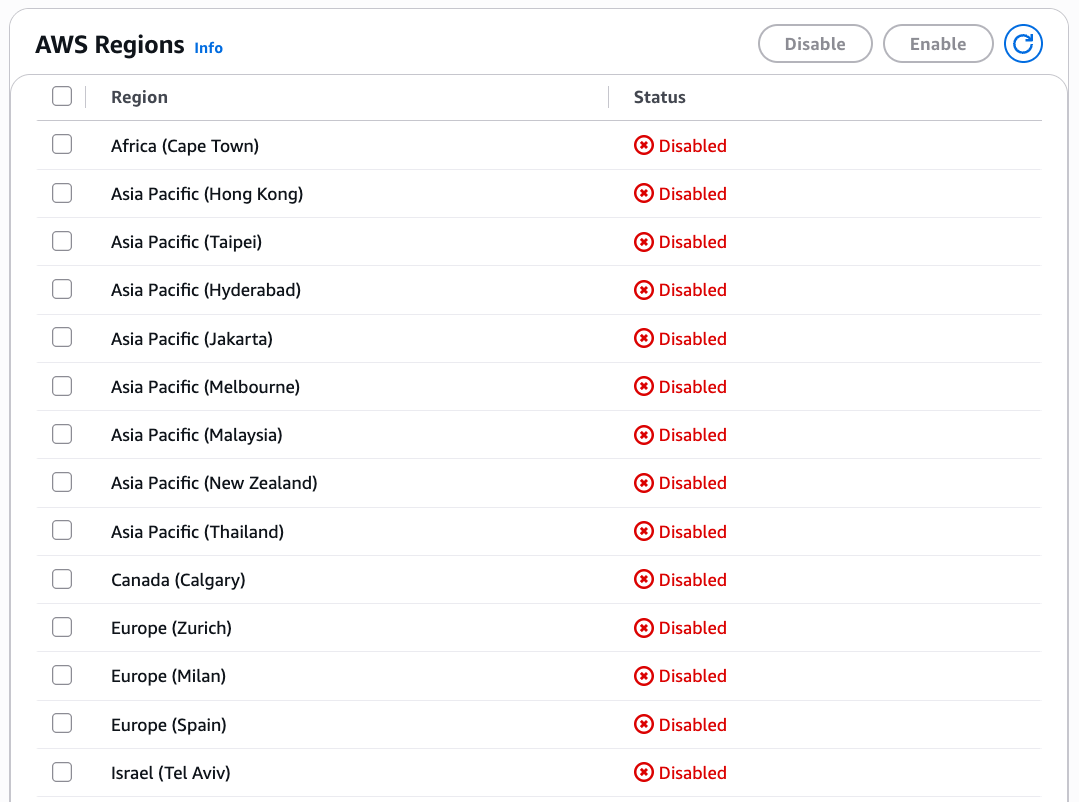 Disabled Regions
A budget action as a circuit breaker#
A budget action turns the threshold from the first post into something that acts. At a percentage you choose, AWS can attach an IAM policy to a user, group, or role, attach an SCP if you have an organization, or stop EC2 and RDS instances. Up to 50 actions per budget.
It needs an execution role whose trust policy lets budgets.amazonaws.com call sts:AssumeRole, with permissions for whatever the action does: iam:AttachUserPolicy, organizations:AttachPolicy, ec2:StopInstances, and so on. AWS publishes example templates for both variants. On the administration side, the managed policy AWSBudgetsActionsWithAWSResourceControlAccess covers configuring actions, including an iam:PassRole scoped by the iam:PassedToService = budgets.amazonaws.com condition. Do not confuse it with the AWSServiceRoleForBudgets service-linked role, which is for billing views rather than action execution.
A deny-all policy attached by a budget action locks out the principal it targets. If you belong to that group or role, it locks you out at the exact moment you need to investigate.
Four mitigations, in order of importance:
- Deny narrowly. Target new-spend actions, not everything.
- Set the action to manual approval first. Automatic is for after you have watched it behave.
- Never target root or your break-glass IAM user.
- Keep the deny policy reversible and write down how to detach it.
A narrow deny that is genuinely useful looks like this:
{
    "Version": "2012-10-17",
    "Statement": [{
        "Sid": "BlockExpensiveOnBudgetBreach",
        "Effect": "Deny",
        "Action": [
            "ec2:RunInstances", "ec2:StartInstances",
            "sagemaker:Create*",
            "bedrock:InvokeModel", "bedrock:InvokeModelWithResponseStream"
        ],
        "Resource": "*"
    }]
}
The first two action-enabled budgets are free per month, regardless of how many actions each one configures. Beyond that it is $0.10 per budget per day, roughly $3 a month. SCP-type actions require an organization and only run from the management account, and from there you can attach an SCP to another account but cannot stop EC2 or RDS in one.
Break-glass, restated#
Keep root with a phishing-resistant MFA device plus a backup, stored in a password manager and offline. Keep one IAM user with AdministratorAccess and its own MFA, excluded from the region-deny policy and outside any budget-action target group, with credentials stored offline. Write down how to detach a bad policy.
Root can override an identity-policy lockout in its own account, but it cannot override an SCP. If you break something with an SCP, the management account is your only way back in. Its root credentials therefore have to stay secure and outside SCP reach.
Regional defaults for services you do not run yet#
These defaults take a minute each and cost nothing. Set them now so they are already in place when you launch something.
IMDSv2 as the account default, available per region since March 25, 2024. New instance types have been IMDSv2-only since mid-2024, but the account default covers all new launches regardless of type:
aws ec2 modify-instance-metadata-defaults --http-tokens required --http-put-response-hop-limit 2 --region us-west-2
aws ec2 get-instance-metadata-defaults --region us-west-2
EBS encryption by default, also per region:
aws ec2 enable-ebs-encryption-by-default --region us-west-2
aws ec2 get-ebs-encryption-by-default --region us-west-2
And snapshot public-access blocking:
aws ec2 enable-snapshot-block-public-access --state block-all-sharing
All three are per-region settings that affect new resources only, not existing ones. Existing instances need modify-instance-metadata-options; existing volumes stay unencrypted. EBS encryption by default uses the free aws/ebs managed key, so it costs nothing, though it does mean you can no longer create unencrypted volumes in that region or share encrypted volumes cross-account. The IMDSv2 default can be overridden at launch, so if you want it enforced rather than defaulted, use an SCP or an ec2:MetadataHttpTokens condition. Watch the MetadataNoTokenRejected CloudWatch metric before disabling IMDSv1 anywhere real.
While you are cleaning up regions, delete the default VPCs in ones you do not use. They cost nothing to keep, but they are a ready-made launch pad. The dependency order per VPC is: detach and delete the internet gateway, delete subnets, delete non-main route tables, delete non-default network ACLs, delete non-default security groups, then delete the VPC.
#!/usr/bin/env bash
set -uo pipefail

# Only enabled regions — opt-in regions you haven't enabled will error out.
regions=$(aws ec2 describe-regions --query 'Regions[].RegionName' --output text)

for r in $regions; do
  vpc=$(aws ec2 describe-vpcs --region "$r" \
        --filters Name=isDefault,Values=true \
        --query 'Vpcs[0].VpcId' --output text 2>/dev/null)

  if [ -z "$vpc" ] || [ "$vpc" = "None" ]; then
    echo "$r: none"
    continue
  fi

  # Safety check: bail if anything is actually using the VPC.
  enis=$(aws ec2 describe-network-interfaces --region "$r" \
         --filters Name=vpc-id,Values="$vpc" \
         --query 'length(NetworkInterfaces)' --output text)
  if [ "$enis" != "0" ]; then
    echo "$r: $vpc SKIPPED — $enis ENIs in use"
    continue
  fi

  echo "$r: deleting $vpc"

  for igw in $(aws ec2 describe-internet-gateways --region "$r" \
      --filters Name=attachment.vpc-id,Values="$vpc" \
      --query 'InternetGateways[].InternetGatewayId' --output text); do
    aws ec2 detach-internet-gateway --region "$r" --internet-gateway-id "$igw" --vpc-id "$vpc"
    aws ec2 delete-internet-gateway --region "$r" --internet-gateway-id "$igw"
  done

  for sn in $(aws ec2 describe-subnets --region "$r" \
      --filters Name=vpc-id,Values="$vpc" \
      --query 'Subnets[].SubnetId' --output text); do
    aws ec2 delete-subnet --region "$r" --subnet-id "$sn"
  done

  aws ec2 delete-vpc --region "$r" --vpc-id "$vpc"
done
When you do run compute#
If you run compute, follow four rules:
- Never expose SSH or RDP to
0.0.0.0/0. Use SSM Session Manager, which needs no inbound ports or SSH keys and records sessions, or use EC2 Instance Connect. - Require IMDSv2 on every instance, not just as an account default.
- Put workloads in private subnets with NAT or VPC endpoints unless they need to be reachable.
- Attach narrowly scoped roles to instances instead of embedding keys. A compromised instance role should not be able to launch more instances or call Bedrock or SES.
Free detection worth turning on#
IAM Access Analyzer's external access analyzer finds resources shared publicly or cross-account: S3 buckets, IAM roles, KMS keys, and more. It is free, and so is policy validation.
aws accessanalyzer create-analyzer --analyzer-name ext --type ACCOUNT
Create one per region where you have resources. The unused access analyzer is a different product and is paid, at $0.20 per IAM role or user analyzed per month, charged at the beginning of the month, though AWS documents ways to keep that bill down if you decide you want it. The internal access analyzer is likewise paid, per resource per region per month. With one IAM user, skip both. Findings only help if someone reads them, so put a recurring reminder on it or you have bought a dashboard nobody opens.
The other free layer worth checking: Trusted Advisor's core security checks are included on every support plan and cover service limits, open security groups, MFA on root, and public snapshots.
What this costs#
| Control | Recurring cost |
|---|---|
| Quota verification, SES sandbox, Bedrock off | $0 |
| Disabling opt-in regions | $0 |
| Region-deny policy | $0 |
| Budget action | $0 for the first two action-enabled budgets, then roughly $3/month |
| IMDSv2, EBS encryption, snapshot block, default-VPC deletion | $0 |
| IAM Access Analyzer, external only | $0 |
The account-wide controls are now mostly in place. The next post covers what is specific to this stack: DNSSEC and its ordering hazards, Amplify secrets, the Terraform state bucket nobody scans, and an honest list of controls worth skipping.
Originally published at https://iuriio.com/blog/posts/2026/08/aws-hardening-blast-radius