
Adding Automatic Package Version Badges to Storybook's Sidebar


If you maintain a monorepo with a shared Storybook, you have probably wanted the sidebar to answer a simple question without extra clicks: which package does this entry belong to, and what version is it on right now?
This post shows a working approach for doing exactly that in a modern Vue stack. The prototype in this repo uses Nuxt 4, Vue 3.5, Storybook 10, and storybook-addon-tag-badges. The result is a package version pill on the package-root row in the Storybook sidebar, with no manual version maintenance.
The short version is:
- Read the nearest
package.jsonduring Storybook indexing. - Inject a tag such as
version:2.0.6into every indexed leaf entry. - Let the manager UI walk descendants so the badge shows on the package root, not on every child row.
- Keep the addon's other badges working by delegating back to its default
renderLabelfor rows you do not customize.
What This Article Covers#
The implementation here is intentionally grounded in a real, working prototype rather than a theoretical snippet. It covers two common monorepo cases:
- A normal component package with interactive stories, like
my-button - A docs-oriented package that still deserves a place in the sidebar, like
my-utils
There is one important caveat up front: in this prototype, the docs-oriented package is represented by a narrative CSF page, not by a raw unattached MDX entry. That distinction matters with current Storybook behavior, and I will explain why.
The Goal#
We want the sidebar to behave like this:
my-buttonshowsv2.0.6once, on the package rowmy-utilsshowsv1.4.1once, on the package row- Child rows do not repeat the version badge
- Existing addon badges such as
neworexperimentalstill work normally
In other words, we want version information at the level a human actually scans the sidebar.
Here is the prototype in that final state:
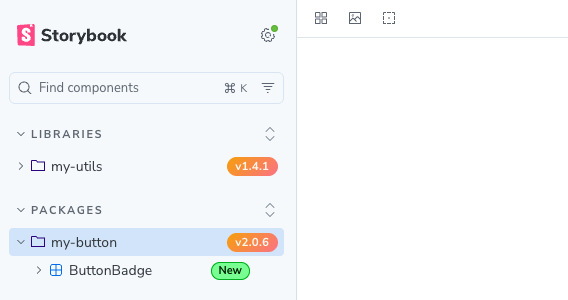 Storybook sidebar showing package version badges for my-utils and my-button
Callout: The orange version pills sit on the package rows
my-utilsandmy-button, while theNewbadge remain on the relevant child entries. That separation is the entire point of the custom manager renderer.
Why Tags Are the Right Bridge#
Storybook tags are the cleanest bridge between build-time metadata and runtime sidebar rendering.
At build time, your indexers can inspect files, read the filesystem, and attach tags to entries. At runtime, the manager UI can read those tags from sidebar metadata without doing any I/O. That makes tags a good transport layer for package versions.
The addon storybook-addon-tag-badges is useful here because it already knows how to render tags as badges and it already has first-class support for a version:* tag pattern. We are not replacing the addon. We are using it as infrastructure and taking control over badge placement.
Runtime Split: Node vs Browser#
This solution depends on keeping two Storybook runtimes separate:
main.tsruns in Node during Storybook startup and indexingmanager.tsruns in the browser and controls the UI shell
That means the code that reads package.json files must stay on the Node side, and the code that renders labels must stay on the manager side.
Here is the architecture at a glance:
That split is not just an architecture preference. It keeps you out of avoidable runtime errors and makes the system easier to reason about.
The Stack Used Here#
At the time this prototype was built, the working stack was:
- Nuxt
4.4.x - Vue
3.5.x - Storybook
10.3.x @storybook/vue3-vite10.3.xstorybook-addon-tag-badges3.1.x
If you are on older Storybook versions, the general idea may still transfer, but the code in this article targets the current Storybook 10 setup style.
Install the Dependencies#
For this Vue and Nuxt setup, I used these dev dependencies at the workspace root:
npm install -D storybook @storybook/vue3-vite @storybook/addon-docs storybook-addon-tag-badges @vitejs/plugin-vue typescript @types/node
And the Nuxt app keeps the current nuxi scripts:
{
    "scripts": {
        "dev": "nuxi dev",
        "build": "nuxi build",
        "preview": "nuxi preview"
    }
}
Step 1: Configure Storybook for a Modern Vue Workspace#
With Storybook 10 and @storybook/vue3-vite, I recommend using defineMain from @storybook/vue3-vite/node.
Here is the working main.ts from the prototype:
// .storybook/main.ts
import path from 'node:path'

import vue from '@vitejs/plugin-vue'
import { defineMain } from '@storybook/vue3-vite/node'
import { mergeConfig } from 'vite'

import { createVersionTaggedIndexers } from './versionTagIndexers.ts'

export default defineMain({
    stories: ['../packages/**/*.stories.@(ts|tsx|js|jsx|mjs)'],
    addons: ['@storybook/addon-docs', 'storybook-addon-tag-badges'],
    framework: {
        name: '@storybook/vue3-vite',
        options: {},
    },
    viteFinal: async (config) => {
        return mergeConfig(config, {
            plugins: [vue()],
        })
    },
    experimental_indexers: createVersionTaggedIndexers({
        workspaceRoot: path.resolve(import.meta.dirname, '..'),
    }),
})
Three details are worth calling out:
defineMainis the current Storybook pattern for typed config in this setup.- The local import uses an explicit
.tsextension because Storybook's ESM build is stricter than many app builds. viteFinaladds@vitejs/plugin-vue, which was necessary in this workspace so Storybook would correctly transform shared.vuefiles from sibling packages.
That last point is easy to miss. If your components live outside the app folder and Storybook tries to parse .vue files as plain JavaScript, this is one of the first places to look.
Step 2: Inject Version Tags at Build Time#
The heavy lifting happens in a custom wrapper around Storybook's built-in indexers.
The job is simple:
- Take each indexed story file.
- Walk up the directory tree.
- Find the nearest package-local
package.json. - Read its
version. - Append a tag like
version:2.0.6to every entry created from that file.
Here is the working helper:
// .storybook/versionTagIndexers.ts
import { existsSync, readFileSync } from 'node:fs'
import path from 'node:path'

import type { Indexer } from 'storybook/internal/types'

import { VERSION_TAG_PREFIX } from './badgeConstants.ts'

type VersionIndexerOptions = {
    workspaceRoot: string
}

const createVersionTag = (version: string | undefined): string | null => {
    if (typeof version !== 'string' || version.length === 0) {
        return null
    }

    return `${VERSION_TAG_PREFIX}${version}`
}

const appendTag = (tags: string[] | undefined, tag: string): string[] => {
    return Array.from(new Set([...(tags ?? []), tag]))
}

const findNearestPackageJson = (filePath: string, workspaceRoot: string): string | null => {
    let directory = path.dirname(filePath)

    while (directory.startsWith(workspaceRoot)) {
        const packageJsonPath = path.join(directory, 'package.json')

        if (directory !== workspaceRoot && existsSync(packageJsonPath)) {
            return packageJsonPath
        }

        const parent = path.dirname(directory)

        if (parent === directory) {
            break
        }

        directory = parent
    }

    return null
}

export const createVersionTaggedIndexers = ({ workspaceRoot }: VersionIndexerOptions) => {
    const versionTagCache = new Map<string, string | null>()

    const getVersionTag = (filePath: string): string | null => {
        const absolutePath = path.isAbsolute(filePath) ? filePath : path.resolve(workspaceRoot, filePath)
        const packageJsonPath = findNearestPackageJson(absolutePath, workspaceRoot)

        if (!packageJsonPath) {
            return null
        }

        if (versionTagCache.has(packageJsonPath)) {
            return versionTagCache.get(packageJsonPath) ?? null
        }

        try {
            const packageJson = JSON.parse(readFileSync(packageJsonPath, 'utf8')) as {
                version?: string
            }
            const versionTag = createVersionTag(packageJson.version)

            versionTagCache.set(packageJsonPath, versionTag)

            return versionTag
        } catch {
            versionTagCache.set(packageJsonPath, null)
            return null
        }
    }

    return async (existingIndexers: Indexer[] = []) => {
        return existingIndexers.map((indexer) => ({
            ...indexer,
            async createIndex(fileName, options) {
                const entries = await indexer.createIndex(fileName, options)
                const versionTag = getVersionTag(fileName)

                if (!versionTag) {
                    return entries
                }

                return entries.map((entry) => ({
                    ...entry,
                    tags: appendTag(entry.tags, versionTag),
                }))
            },
        }))
    }
}
Why wrap the existing indexers instead of writing your own from scratch?
- You keep Storybook's normal CSF indexing behavior.
- You avoid re-implementing framework-specific parsing.
- You add one narrow concern: version metadata enrichment.
That is the right level of responsibility for this module.
Step 3: Move Badge Placement Logic into the Manager#
Once the tag exists, the manager can decide where it should appear.
The default addon behavior is not enough for this use case because it will happily render a version badge on leaf entries. In a large monorepo that becomes visual noise fast.
So the strategy here is:
- Remove the addon's default
versionBadge - Keep the rest of the default badge config
- Add a custom
sidebar.renderLabel - Only render the version pill for package-root rows
- Fall back to the addon's renderer everywhere else
Here is the working renderer:
// .storybook/versionBadgeRenderer.ts
import { createElement, type CSSProperties, type ReactNode } from 'react'

import type { API_HashEntry } from 'storybook/internal/types'
import {
    defaultConfig,
    renderLabel as renderDefaultLabel,
    versionBadge,
} from 'storybook-addon-tag-badges/manager-helpers'

import { PACKAGE_NAME_PREFIX, VERSION_TAG_PREFIX } from './badgeConstants.ts'

const sidebarBadgeStyles: CSSProperties = {
    display: 'inline-flex',
    alignItems: 'center',
    gap: '0.4rem',
    width: '100%',
}

const versionPillStyles: CSSProperties = {
    marginLeft: 'auto',
    padding: '0.22rem 0.55rem',
    borderRadius: '999px',
    background: 'linear-gradient(135deg, #f59e0b, #fb7185)',
    color: '#fff7ed',
    fontSize: '0.72rem',
    fontWeight: 700,
    lineHeight: 1,
    letterSpacing: '0.02em',
}

const tagBadges = defaultConfig.filter((config) => config !== versionBadge)

const getVersionTag = (tags: string[] | undefined): string | null => {
    return tags?.find((tag) => tag.startsWith(VERSION_TAG_PREFIX)) ?? null
}

const isPackageGroup = (item: API_HashEntry): boolean => {
    return item.type === 'group' && item.name.startsWith(PACKAGE_NAME_PREFIX)
}

const isPackageDocsEntry = (item: API_HashEntry): boolean => {
    if (item.type !== 'docs' || typeof item.title !== 'string') {
        return false
    }

    const titleSegments = item.title.split('/')

    return titleSegments.length === 2 && titleSegments[1].startsWith(PACKAGE_NAME_PREFIX)
}

const findDescendantVersionTag = (
    item: API_HashEntry,
    resolveStory: ((id: string) => API_HashEntry | undefined) | undefined,
    visited = new Set<string>(),
): string | null => {
    if (visited.has(item.id)) {
        return null
    }

    visited.add(item.id)

    const directTag = getVersionTag(item.tags)

    if (directTag) {
        return directTag
    }

    if (!resolveStory || !Array.isArray(item.children)) {
        return null
    }

    for (const childId of item.children) {
        const child = resolveStory(childId)

        if (!child) {
            continue
        }

        const childTag = findDescendantVersionTag(child, resolveStory, visited)

        if (childTag) {
            return childTag
        }
    }

    return null
}

const renderVersionLabel = (label: string, versionTag: string): ReactNode => {
    const version = versionTag.slice(VERSION_TAG_PREFIX.length)

    return createElement(
        'span',
        { style: sidebarBadgeStyles },
        createElement('span', null, label),
        createElement('span', { style: versionPillStyles, title: `Version ${version}` }, `v${version}`),
    )
}

export const createBadgeManagerConfig = () => ({
    sidebar: {
        renderLabel: (item: API_HashEntry, api: { resolveStory?: (id: string) => API_HashEntry | undefined }) => {
            if (isPackageDocsEntry(item)) {
                const versionTag = getVersionTag(item.tags)

                return versionTag ? renderVersionLabel(item.name, versionTag) : renderDefaultLabel(item)
            }

            if (!isPackageGroup(item)) {
                return renderDefaultLabel(item)
            }

            const versionTag = findDescendantVersionTag(item, api.resolveStory)

            return versionTag ? renderVersionLabel(item.name, versionTag) : renderDefaultLabel(item)
        },
    },
    tagBadges,
})
There are two important ideas in that file.
Group Entries Often Need Descendant Lookup#
The package group row in the sidebar is often a structural node created by Storybook rather than a leaf entry that originated directly from your source file. That means it may not carry the version tag itself.
So for group rows like my-button, the renderer walks the descendants until it finds the first child that does have a version:* tag. Then it paints the badge on the package root.
That gives you the visual result you want without forcing badges onto every story.
The Addon Still Owns Everything Else#
This part matters.
Once you define your own sidebar.renderLabel, you are replacing Storybook's single sidebar label hook. If you do nothing else, the addon stops rendering badges entirely.
That is why the fallback to renderDefaultLabel from storybook-addon-tag-badges/manager-helpers is essential. It preserves badges like new and experimental on rows you are not customizing.
Step 4: Wire the Manager Config#
The manager file is intentionally small:
// .storybook/manager.ts
import { addons } from 'storybook/manager-api'

import { createBadgeManagerConfig } from './versionBadgeRenderer.ts'

addons.setConfig({
    ...createBadgeManagerConfig(),
})
That is usually a good sign. The policy lives in one helper; the manager only applies it.
Step 5: Model a Component Package and a Docs-Oriented Package#
The prototype includes two packages because this is where many articles become misleading. It is easy to make the component-story case work. It is harder to make an article honest about the docs-oriented case.
Component Package#
my-button is a normal Vue package with a .vue component and a standard .stories.ts file. Because the stories are indexed directly, the version tag injection is straightforward.
Docs-Oriented Package#
my-utils represents a package that belongs in the sidebar even though it is not shipping an interactive component story.
In this prototype, I model that package as a narrative CSF page in overview.stories.ts rather than as a raw unattached MDX document.
With the current Storybook 10 setup used here, wrapped indexers reliably enriched story-indexed entries, but a raw unattached MDX docs entry did not behave the same way for this sidebar badge flow. If your goal is a dependable package-root sidebar badge, a story-indexed narrative page is the safer shape.
This is the kind of caveat that is easy to hide in a blog post and expensive for readers to discover later.
Callout:
my-utilsstill gets itsv1.4.1badge on the package row, even though the selected content is a narrative reference page rather than a traditional component story. This is the safe, working shape I would recommend documenting unless you have already verified your raw MDX flow in your exact Storybook version.
Verification: Check Both Data and UI#
Do not stop at one verification step.
I recommend checking this in two layers:
- Build Storybook and inspect
storybook-static/index.json - Run the dev server and look at the actual sidebar
For the first step:
npm run storybook:build
Then inspect the built index and confirm tags such as:
version:2.0.6on entries undermy-buttonversion:1.4.1on entries undermy-utils
That proves the data bridge is working.
For the second step:
npm run storybook
Then confirm the UI behavior:
- The package-root row gets the version pill
- Child rows do not repeat it
- Other addon badges still render where expected
That proves the manager behavior is working.
You need both checks because a correct index does not automatically guarantee correct package-root rendering.
If you are publishing this internally for your team, I would keep the screenshots close to this section as well. They turn the verification step from an abstract checklist into something reviewers can compare visually in a few seconds.
Why This Approach Holds Up in a Monorepo#
This design scales reasonably well because the responsibilities are narrow:
- The indexer enriches entries with metadata
- The renderer decides where metadata should be visible
- Package ownership is inferred from the filesystem instead of duplicated in story files
That means adding a new package is usually just this:
- Give the package a
package.jsonwith a version - Put stories or a narrative story page inside that package
- Keep the sidebar naming convention consistent enough for your package-root detection logic
The last point is the only part that is intentionally repo-specific. In this prototype, package rows are detected with a simple my- prefix. In a real monorepo, you might prefer a more deliberate rule based on title depth, story hierarchy, naming conventions, or custom tags.
Practical Caveats#
This is the section I would have wanted to read before implementing it.
experimental_indexers Is Still Experimental#
The API is useful and perfectly workable, but it is still explicitly experimental in Storybook 10. Pin your Storybook version and expect to re-check this code when upgrading.
ESM Local Imports Matter#
In this setup, Storybook's ESM build wanted explicit local file extensions such as ./versionTagIndexers.ts. If you leave those off because your app build normally tolerates it, Storybook may be less forgiving.
Shared Vue SFCs May Need Explicit Vite Setup#
If your components live in sibling packages rather than directly under one app, Storybook may need an explicit viteFinal merge with @vitejs/plugin-vue so those .vue files are transformed correctly.
Raw MDX Is Not the Same as Story-Indexed Docs#
If you are thinking, "I will just make every docs-only package a raw MDX file," test that assumption in your exact version combo. In this prototype, a narrative CSF page gave the reliable result for sidebar version badges.
Verification Should Include a Full Build#
Always run:
npm run storybook:build
The dev server is useful, but full builds are better at surfacing import-boundary and config issues.
Where You Can Extend This Next#
Once the pipeline exists, version badges are just one use case.
The same tag-enrichment pattern can support things like:
- release channel badges such as
alpha,beta, orstable - ownership tags such as
team:design-systems - lifecycle tags such as
deprecatedorsunset - publish metadata such as
published:2026-04-18
You can also use the addon for docs content itself. If you have attached MDX or story-based docs and want badges in the page body, storybook-addon-tag-badges also exposes MDX helpers for that use case.
Final Takeaways#
If you want package version badges in Storybook's sidebar without hand-maintained metadata, the cleanest current approach is:
- enrich stories at build time with
version:*tags - keep Node-side indexing and browser-side rendering separate
- let the addon keep doing badge work you do not need to customize
- move version pills up to the package root by walking descendants
- treat docs-oriented packages as a distinct case and test them honestly
It is a small feature, but in a large monorepo it adds real navigational value. A sidebar that quietly answers "what package is this and what version is it on?" is better tooling than a sidebar that just lists names.
Originally published at https://iuriio.com/blog/posts/2026/04/storybook-v10-sidebar-badges